Sensemitter is now Emhance.
Read more

Articles
The Best AI Tools For Game Development
Written by:
Emer Rutherford
|
Marketing Generalist
Every studio's Slack has an AI tool recommendation in it right now. Someone found a code assistant that cuts sprint time. Someone else found an art generator that produces a hundred concept variants before lunch. Sorting out what's actually worth adopting, versus what's just noise, is its own job.
This guide breaks down where AI is genuinely useful across game development — by category, with the specific tools worth knowing in each — so the next recommendation in Slack is easier to evaluate.
AI tools for art and asset generation
Midjourney
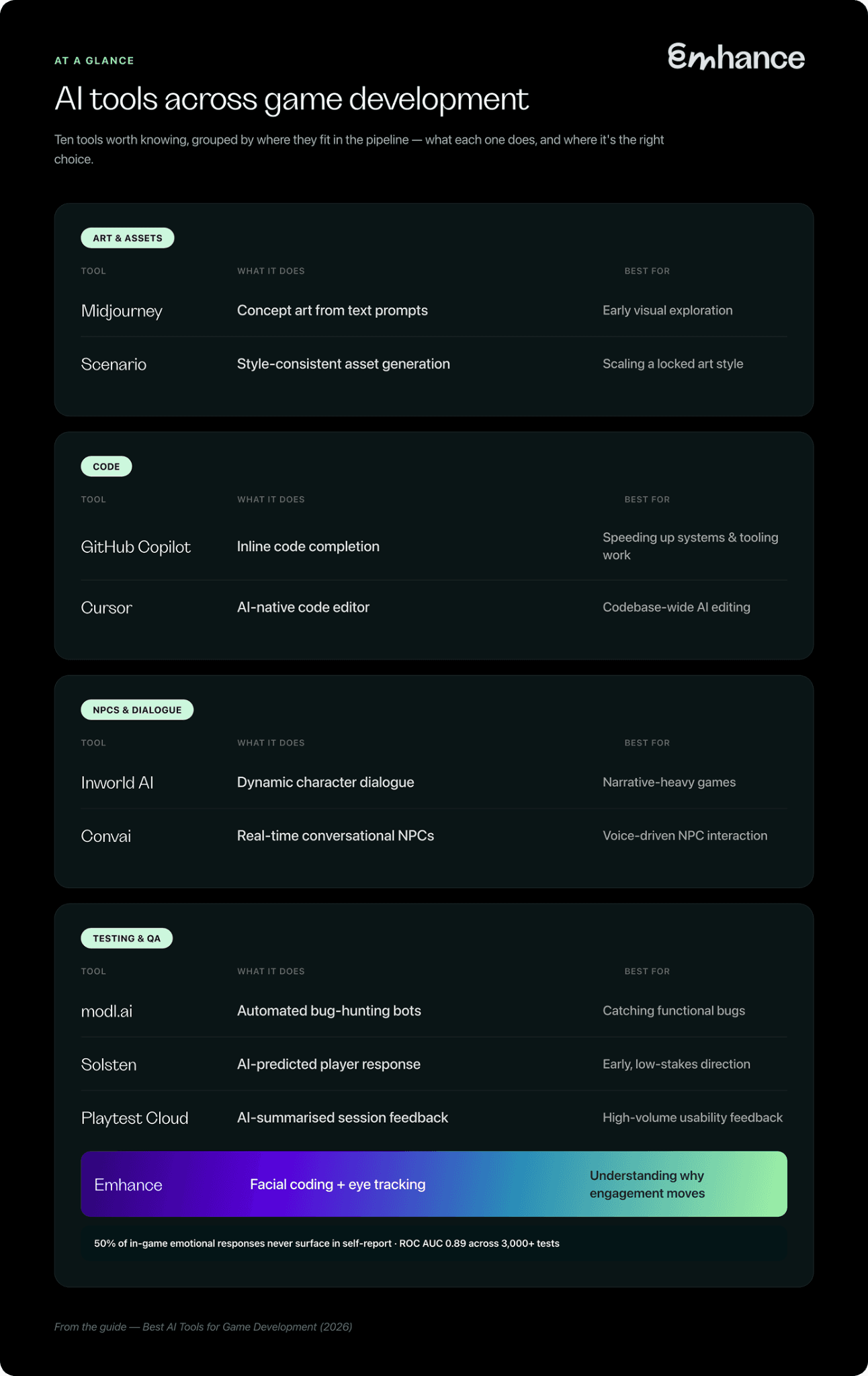
Midjourney generates concept art, environment sketches, and style-exploration boards from text prompts. It's become a default first pass for pre-production — fast, cheap iteration before an artist touches Photoshop or Blender.
Best for: early visual exploration and style direction, before an art bible exists.
Watch for: output drifts from any style you feed it — without careful prompting and curation, ten concepts can mean ten different visual directions, not one.
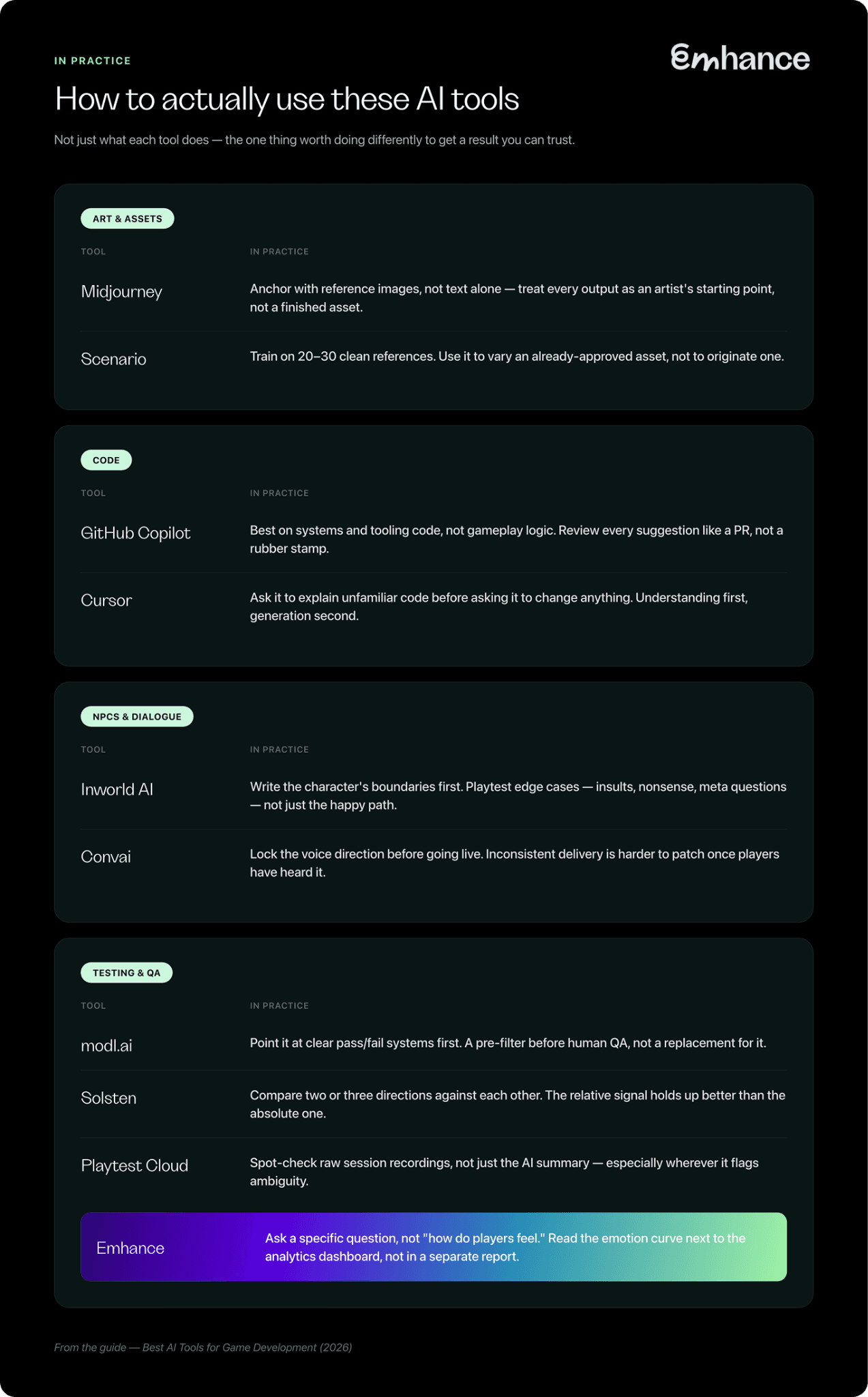
In practice: used earliest, before pre-production locks anything down. Feed it reference images from your own game rather than describing a look from scratch — image prompts anchor the output far more reliably than text alone. Treat every result as a starting point for an artist to redraw, not a finished asset just because it looks right at a glance.
Scenario
Scenario is built specifically for game asset pipelines — trained on a studio's own style references to produce texture sets, sprite variants, and item icons that stay consistent with an established look, rather than generic outputs.
Best for: teams with a locked art style who need volume — icon sets, item variants, texture packs — without diluting it.
Watch for: consistency is only as good as the reference set it's trained on — a small or inconsistent library produces the same drift Midjourney has, just slower to notice.
In practice: used once production is underway and a style is already approved — this is a scaling tool, not a discovery one. Train it on a tight set of 20–30 clean, consistent examples rather than a larger messy one; a smaller curated set produces more reliable output than volume does. Use it to generate variations of an asset that's already been signed off, not to originate the anchor asset itself.
AI tools for code and development
GitHub Copilot
Copilot autocompletes and generates code inline from natural-language prompts. For game dev, that means faster boilerplate, gameplay scripting, and tooling work — the repetitive parts of a codebase, not the creative parts.
Best for: speeding up systems programming and repetitive scripting across an existing codebase.
Watch for: suggested code still needs the same review as a junior engineer's PR — it will confidently generate code that compiles and does the wrong thing.
In practice: used throughout production, most reliably on the systems and tooling layers — save/load, UI plumbing, editor scripts — rather than gameplay-critical logic, where a subtle bug is expensive to trace back. Review every suggestion the way you'd review a PR from someone new to the codebase, not a rubber stamp.
Cursor
Cursor is a full code editor built around AI-assisted editing — multi-file changes and codebase-aware chat, rather than single-line completion.
Best for: teams that want AI woven into the whole editing workflow, not just autocomplete.
Watch for: multi-file AI edits are harder to review line-by-line than a single suggestion — without a strong PR habit already in place, mistakes propagate further before anyone catches them.
In practice: most useful when someone is working in an unfamiliar part of the codebase — use the chat to ask how an existing system works before asking it to change anything. Understanding first, generation second; skipping straight to "make this change" in code you don't know yet is where multi-file edits get away from you.
AI tools for NPCs and dialogue
Inworld AI
Inworld AI generates dynamic character dialogue and behaviour, letting NPCs respond to what a player actually says or does instead of following a fixed branching tree.
Best for: narrative-heavy games where scripting every possible player interaction by hand isn't feasible.
Watch for: dynamic dialogue can say things you didn't write and wouldn't approve — it needs the same content guardrails and testing a live chat feature would get, not less.
In practice: set up during production, once core characters and their boundaries are defined — a strict character brief written before wiring it up matters more than any setting inside the tool, since the model improvises within whatever guardrails you give it. Playtest the edge cases specifically (insults, nonsense, meta questions about the game itself), not just the conversations you expect players to have.
Convai
Convai does a similar job — real-time conversational NPCs — with a stronger focus on voice and integration into multiplayer and 3D worlds.
Best for: projects where NPCs need to hold a spoken conversation, not just display text.
Watch for: voice adds a second failure mode on top of dialogue content — tone and delivery can undercut a scene even when the words are fine.
In practice: worth locking the voice direction — accent, pacing, register — before turning on live conversation, the same way you'd brief a voice actor. Inconsistent delivery is more noticeable in audio than in text, and harder to patch once players have heard it.
AI tools for player testing and QA
This is the category where AI has the most direct line to a retention chart or a revenue number, rather than just development speed.
modl.ai
modl.ai uses AI bots to automatically play through a build, hunting for crashes, soft-locks, and progression blockers before a human ever sees them.
Best for: catching functional bugs — it's a bug hunt, not a read on whether players enjoyed what they played.
Watch for: a clean bot run doesn't mean a clean player experience — bots don't get bored, confused, or frustrated, so they won't flag the issues that actually drive churn.
In practice: run continuously through production, not as a one-off pass before launch — pointed at systems with a clear pass/fail state first (progression gates, crash conditions), where "found a bug" is unambiguous. Treat it as a pre-filter that clears the obvious issues before human QA time gets spent, not a replacement for that pass.
Solsten
Solsten takes a written description of a game and returns a predicted player response, without recruiting anyone or running a session. It's fast because there's no player in the loop — which is also the ceiling: it's evaluating a description, not the game.
Best for: early, low-stakes direction before there's a build worth testing properly.
Watch for: treat the output as a hypothesis, not a finding — a prediction from a description can't catch a reaction nobody would have predicted from reading about the mechanic.
In practice: used earliest — on paper, before a build exists. Get more value comparing two or three directions against each other than validating a single concept in isolation; the relative signal between options holds up better than the absolute read on any one of them.
Playtest Cloud
Playtest Cloud recruits from a games-specific pool and runs unmoderated sessions at speed, using AI to summarise session recordings and written feedback. That saves a research team hours of manual review, but it's still self-report underneath — a model condensing what players typed, not measuring what they felt. If Playtest Cloud is already in your stack and you're weighing what else is out there, we've compared it against the alternatives in more depth: Playtest Cloud alternatives.
Best for: high-volume functional and usability feedback, where turnaround speed matters more than emotional signal.
Watch for: an AI summary condenses what players typed, not what they felt — confusion and satisfying difficulty can produce the same recap.
In practice: fits pre-launch, run against a playable build — most useful for functional and usability passes at volume. Read a sample of the raw session recordings yourself, not just the summary, especially anywhere the summary flags ambiguity — the model's condensing choices are a filter on the data, not the data itself.
Emhance
Emhance uses facial coding and eye tracking to measure what players feel while they play, rather than relying on what they say afterward. About 50% of in-game emotional responses never surface in a survey — measuring emotional intensity and concentration together, second by second, is how one client traced a 9.6% level-3 completion lift back to a single confusing rule change, not a difficulty problem.
Best for: understanding why engagement actually rises or falls — in FTUE, a core loop, or an ad creative.
Watch for: this measures facial muscle activity and eye movement as a proxy for engagement, not emotions as literal states — worth knowing going in if you're the type to ask a vendor how a methodology actually works.
In practice: used pre-launch on a build, and again post-launch on updates and ad creative — it's a recurring diagnostic, not a one-time check. Go in with a specific question rather than "how do players feel generally" — the sharpest findings come out of a named moment (a tutorial step, a pop-up, a specific second of a creative), not a whole-session average. Put the emotion curve next to the analytics dashboard, not in a separate report nobody cross-references.
Where these tools fit in your production timeline
Pre-production. Art generation earns its keep here — before a visual identity is locked, fast concept iteration is pure upside. This is also when a prediction tool like Solsten is worth a look, if there's a design on paper but nothing playable yet.
Production. Code assistants compound the most here, since this is where the volume of repetitive scripting and tooling work actually lives. NPC and dialogue tools belong in this phase too — building the behaviour systems early leaves enough runway to test and tune tone before launch.
Pre-launch. Testing tools matter most here. A bug-hunting bot like modl.ai catches functional issues before a human ever plays the build; player-testing tools catch what no bot can — confusion, frustration, boredom — while there's still time to fix the FTUE or core loop before it ships.
Live-ops. The same testing tools carry into post-launch, applied to updates, new content, and ad creative instead of the initial build. Retention problems and underperforming creative are usually diagnosed here, not before launch.
How to decide what to adopt first
Three questions cut through most of the noise before picking a tool:
What's actually the bottleneck? Production being slow is a different problem than not knowing whether the game is any good once it's built. AI tools tend to solve one or the other — rarely both.
Is this something players will notice, or something invisible to them? Faster code and faster concept art change how quickly a studio ships. They don't change what players experience once it does. Tools that touch dialogue, testing, or creative do — and need a higher bar for review before anything reaches a player.
How will you know it worked? "It feels faster" isn't a metric. Sprint velocity, bug count, retention, completion rate — pick the number the tool is actually supposed to move, and check it moved, before rolling it out further.
A checklist before you roll one out
The three questions above are the thinking. This is the version you can actually run through before adopting anything from this guide:
Named the specific bottleneck this tool is meant to fix — not "AI would help here" in general
Confirmed whether its output reaches players directly (dialogue, art, testing) or stays internal (code, tooling)
If it's player-facing, assigned a human review step before anything ships — someone accountable for catching what the model gets wrong
Picked one metric that should move if it's working (sprint velocity, bug count, retention, completion rate)
Set a date to check that metric — a few weeks out, not "eventually"
Decided what happens if it doesn't move — worth knowing before you're three sprints in, not after
If a tool can't clear the first two lines, it's not ready to adopt yet — it's still worth a trial, not a rollout.
Quick reference: AI tools across game development
Choosing by the problem you have
Need to move fast on visual direction before the art style is locked. Start with Midjourney; move to Scenario once there's a style worth protecting.
Drowning in repetitive scripting work. Copilot or Cursor claw back the most time for the least workflow disruption.
Writing branches you can't scale by hand. Inworld AI or Convai remove the need to script every possible player line.
Bugs and crashes eating QA time. An automated bot like modl.ai catches what a human tester would eventually find, just faster.
Retention or engagement you can't explain. This is where prediction and self-report both fall short — measuring the actual emotional response is what closes the gap.
FAQ: AI tools in game development
Will AI replace game developers?
Not the creative and judgement-heavy parts. What it's replacing is the repetitive layer underneath them — boilerplate code, first-pass concept art, draft dialogue trees, manual bug-hunting. Someone still has to decide if the result is any good.
What are the best free AI tools for indie game developers?
Most of the code and art tools have usable free tiers — Midjourney, Copilot, and similar are cheap or free at low volume, which is part of why they've spread so fast in indie dev. Player-testing tools are the exception: recruiting real players, even a handful, costs money regardless of how much AI sits underneath.
Does AI work for solo developers and small teams?
For art, code, and dialogue tools — yes, with no real scale requirement. For player testing specifically, the constraint isn't the AI, it's recruiting players; platforms built for scale work whether the team behind the request is two people or two hundred, but the bar for "worth testing" is higher without a dedicated research budget.
Do these tools work across all game genres, or mainly mobile?
Depends on the tool. Art and code tools are genre-agnostic. Testing tools vary more — something like Solsten works from a description, so genre matters less than how well-established its conventions are in the training data. Facial coding and eye tracking work on anything played facing a camera, but most games-specific testing vendors, Emhance included, built their playbook around mobile first.
Glossary
FTUE (first-time user experience): the first minutes a new player spends in the game — the tutorial and the first few sessions, where most retention is won or lost.
Self-report: anything a player tells you directly — a survey answer, an interview response, a written comment. Useful, but shaped by recall bias and social pressure.
ROC AUC: a standard way to score how well a model separates two outcomes — 0.5 is random guessing, 1.0 is perfect. Used here as a measure of how reliably a signal predicts a real outcome.
Churn: players who stop playing and don't come back.
Live-ops: the ongoing work of running a game after launch — updates, events, new content — as opposed to the build-it-once work of initial development.

Where to start
Most of the AI tools in this guide save time somewhere in the pipeline. A smaller number — mainly in testing — tell you something true about how players actually feel. Start with whichever one matches the problem actually in front of you, not the tool with the loudest launch post.