Sensemitter is now Emhance.
Read more

Articles
The Best Player Feedback Tools for Live Games in 2026
Written by:
Emer Rutherford
|
Marketing Generalist

A patch ships. Ratings drop half a point. The support queue fills up. Discord lights up with the same three complaints, worded five hundred different ways.
None of that is a shortage of feedback. Most live-service studios are drowning in it — reviews, tickets, NPS scores, a Discord server that never sleeps. The shortage is somewhere else: nobody can say which of those signals is the actual cause, and which is noise from the loudest ten players in a community of ten thousand.
This guide covers the tools studios use to collect and organise that feedback once a game is live, what each one is actually built to tell you, and where the trail goes cold.
What to look for in a live-game feedback tool
Four questions before picking one:
Does it tell you what changed, or why? A rating drop, a spike in tickets, a Discord thread — all of these tell you that something moved. Almost none of them tell you which moment in the patch, event, or update caused it.
Is it built for how live games actually ship? Content drops, balance patches, and limited-time events happen on a cadence general feedback software wasn't built around. A tool bolted on from SaaS customer support behaves differently than one built for a live-service calendar.
Does it separate signal from volume? A five-star review and an angry Discord thread are both "feedback." The loudest reaction isn't always the most common one, and the most common one isn't always the one that matters.
Does it scale to what a live game actually generates? A top-grossing title can produce thousands of reviews a week and a Discord server in the tens of thousands. A tool built for a trickle of enterprise support tickets won't hold up.
The tools
1. AppFollow — review and ratings monitoring
AppFollow pulls App Store and Google Play reviews into one dashboard, tags them by event window, and scores sentiment and recurring phrases across languages.
Its own 2026 gaming dataset shows the average studio replies to 24.8% of reviews, against 52.4% for AppFollow's clients — and AI-assisted replies cut the time cost from roughly 300 hours a month to under 25. That's a real efficiency gain. What it doesn't do is explain why a review says what it says — a one-star review naming "the new event" still needs someone to work out which part of the event caused the reaction.
Best for: turning a flood of public reviews into a searchable, taggable archive you can compare release over release.
2. Helpshift — in-app player support
Helpshift runs support inside the game itself — FAQs, in-app messaging, ticket triage — without sending players to email or a browser.
It's genuinely games-native: Helpshift is used by 34 of the top 100 grossing gaming apps, including Jam City, Playrix, and Halfbrick. In Jam City's own published case study, moving off email cut ticket volume 30% and doubled CSAT. The signal is real, but it's inherently self-selecting — you're hearing from players frustrated enough to open a ticket, not the larger group who just quietly stopped playing.
Best for: catching and resolving player-reported issues fast, at a volume email support can't handle.
3. Alchemer — in-game surveys and NPS
Alchemer runs structured surveys and NPS prompts inside an app, including as part of the native ratings-prompt flow, so studios can ask a direct question instead of waiting for one in a review.
It's not built specifically for games, but the games industry already routes through it — PlaytestCloud, for instance, documents how to plug an Alchemer survey directly into a playtest so results land alongside session data. The trade-off is the same one every survey has: an NPS score tells you sentiment moved, not which moment in the session produced the number.
Best for: tracking a single, trendable sentiment number release over release, and asking players a direct question when you already know what to ask.
4. Levellr — Discord and community sentiment
Levellr reads Discord activity — chat, reactions, sentiment shifts — and turns it into dashboards a community or live-ops team can act on, without someone manually scrolling a server with tens of thousands of members.
It's built specifically for games: its named users include Epic Games, Krafton, and Scopely. The gap is who's talking. Discord skews toward your most engaged, most vocal players — useful for catching a sentiment shift early, less useful as a read on your average player, who probably isn't in your server at all.
Best for: catching a sentiment shift in your most engaged community fast — often before it reaches a review or a support ticket.
5. Centercode — structured beta feedback programs
Centercode manages structured beta and early-access programs — recruiting testers, collecting feedback through forms, and routing issues to the right team.
It's not games-specific — its named customers span consumer electronics and enterprise software more than live-service games — but studios running a soft launch or a pre-season beta use it to organise feedback before opening the floodgates to a full audience.
Best for: a structured, contained feedback loop before a major content drop goes to everyone.
6. Emhance — the missing signal
Every tool above captures what players say — in a review, a ticket, a Discord message, a survey response. None of them capture what players felt in the moment that produced the reaction.
That gap is exactly what showed up for Peaksel, on their live game The Vault. Analytics had already done the job the tools above do — it flagged a clear drop-off before level 3. What it couldn't say was why.
Facial coding found the mechanism: the tutorial had taught players to interact with one vault face at a time, but the live game asked them to explore several at once. Players weren't stuck on difficulty — they hit a boredom state within 45 seconds of a rule the tutorial never taught. The fix was two levels redesigned, not a new tutorial or a full FTUE rebuild.
"After implementing Emhance's recommendations across levels 1–3 of our game, we saw 9.6% more users completing level 3 and as a consequence, 7.3% more users reaching level 10, which resulted in 14.5% LTV uplift." — Marko Petkovic, CEO, Peaksel
Emhance runs that same kind of targeted playtest against whatever patch, event, or feature your reviews and tickets are already flagging — measuring emotional intensity and concentration together, mapped second by second, so instead of "players are unhappy about the new event," you get the specific moment inside it where engagement actually broke.
Best for: the point where reviews, tickets, or Discord have already told you something's wrong, and you need to know exactly what and where before the next patch.
How the tools compare
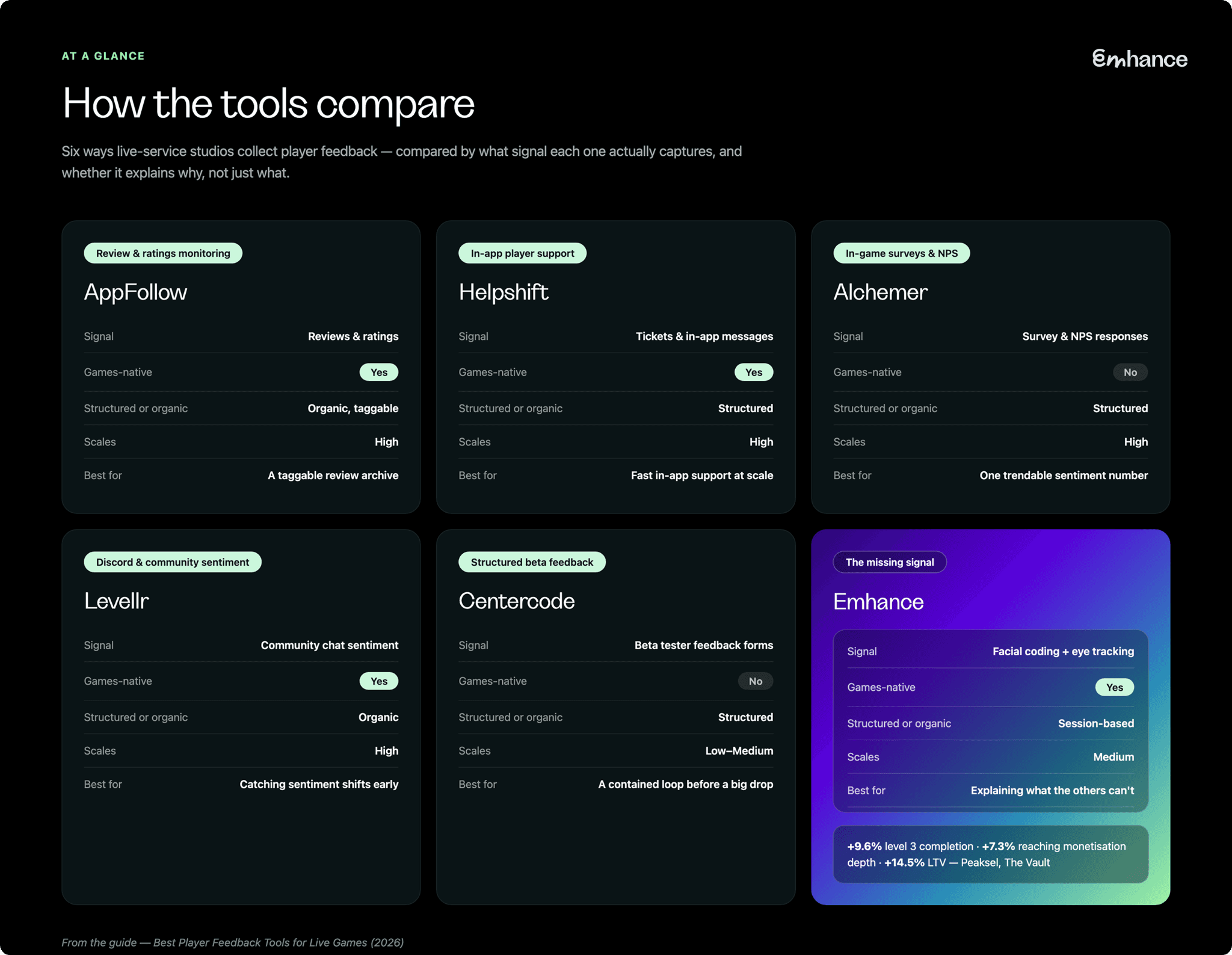
Choosing by the problem you actually have
Ratings dropped and you can't tell which review is signal. Start with review monitoring — tag by event window and read the pattern before assuming it's the whole update.
Support tickets are outpacing what the team can triage. That's a support-platform problem first. Fix the queue before trying to diagnose sentiment.
You want one trendable number to track release over release. A direct survey or NPS prompt gives you that number — just don't expect it to explain the number.
The loudest reaction is happening in Discord, not the store page. Community sentiment tools catch it early, but remember it's your most engaged players talking, not your average one.
Reviews, tickets, and Discord all agree something's wrong, but nobody can say what. That's not a volume problem anymore — it's a resolution problem. This is where a targeted, biometric playtest against the specific patch or feature earns its cost.
FAQ: player feedback tools for live games
What's the difference between player feedback and player research?
Player feedback is what players volunteer on their own — reviews, tickets, Discord messages, survey responses. Player research is something a studio runs deliberately, on a specific question, with a specific method. Feedback tells you something's happening. Research is how you find out why.
How many feedback channels does a live game actually need?
Fewer than most studios run. Reviews and tickets are close to non-negotiable — they're where players go anyway. Beyond that, add a channel when it answers a question the others can't, not because a competitor has it.
Can review or ticket sentiment tell you why retention dropped?
It can tell you that players are unhappy and roughly what they're unhappy about. It rarely tells you which specific moment in a patch or event caused the drop — that requires watching or measuring the moment itself, not reading a description of it afterward.
Is Discord sentiment a reliable read on your whole player base?
No — treat it as an early-warning system, not a survey. The players active enough to be in your Discord and vocal enough to post are a specific, more-engaged slice of your audience, not a representative one.
Do you need biometric testing if you already run reviews, tickets, and surveys?
Depends on the question. If you can already name the fix, you don't need it. If three feedback channels agree something's wrong and none of them agree on why, that's exactly the gap a targeted playtest is built to close.
Where to start
Reviews, tickets, and community sentiment aren't wrong — they're just partial. Each one tells you players reacted. None of them, on their own, tells you to what, exactly, or when.
If your feedback channels are already pointing at a problem and nobody can pin down the moment inside it, that's worth testing directly — on your own patch, before the next one ships.